Adversarial machine learning with Lux.jl
The purpose of this tutorial is to explain how to embed a neural network model from Lux.jl into JuMP.
Required packages
This tutorial requires the following packages
using JuMPimport Luximport Ipoptimport MathOptAIimport MLDatasetsimport MLUtilsimport OneHotArraysimport Optimisersimport Plotsimport Randomimport ZygoteData
This tutorial uses images from the MNIST dataset.
We load the predefined train and test splits:
train_data = MLDatasets.MNIST(; split = :train)dataset MNIST:
metadata => Dict{String, Any} with 3 entries
split => :train
features => 28×28×60000 Array{Float32, 3}
targets => 60000-element Vector{Int64}test_data = MLDatasets.MNIST(; split = :test)dataset MNIST:
metadata => Dict{String, Any} with 3 entries
split => :test
features => 28×28×10000 Array{Float32, 3}
targets => 10000-element Vector{Int64}Since the data are images, it is helpful to plot them. (This requires a transpose and reversing the rows to get the orientation correct.)
function plot_image(x::Matrix; kwargs...) return Plots.heatmap( x'[size(x, 1):-1:1, :]; xlims = (1, size(x, 2)), ylims = (1, size(x, 1)), aspect_ratio = true, legend = false, xaxis = false, yaxis = false, kwargs..., )endfunction plot_image(instance::NamedTuple) return plot_image(instance.features; title = "Label = $(instance.targets)")endPlots.plot([plot_image(train_data[i]) for i in 1:6]...; layout = (2, 3))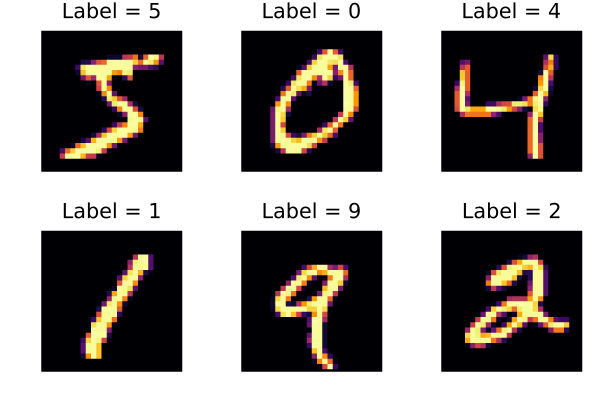
Training
We use a simple neural network with one hidden layer and a sigmoid activation function. (There are better performing networks; try experimenting.)
chain = Lux.Chain( Lux.Dense(28^2 => 32, Lux.sigmoid), Lux.Dense(32 => 10), Lux.softmax,)rng = Random.MersenneTwister();parameters, state = Lux.setup(rng, chain)predictor = (chain, parameters, state);Here is a function to load our data into the format that predictor expects:
function data_loader(data; batchsize, shuffle = false) x = reshape(data.features, 28^2, :) y = OneHotArrays.onehotbatch(data.targets, 0:9) return MLUtils.DataLoader((x, y); batchsize, shuffle)enddata_loader (generic function with 1 method)and here is a function to score the percentage of correct labels, where we assign a label by choosing the label of the highest softmax in the final layer.
function score_model(predictor, data) chain, parameters, state = predictor x, y = only(data_loader(data; batchsize = length(data))) y_hat, _ = chain(x, parameters, state) is_correct = OneHotArrays.onecold(y) .== OneHotArrays.onecold(y_hat) p = round(100 * sum(is_correct) / length(is_correct); digits = 2) println("Accuracy = $p %") returnendscore_model (generic function with 1 method)The accuracy of our model is only around 10% before training:
score_model(predictor, train_data)score_model(predictor, test_data)Accuracy = 9.73 %
Accuracy = 9.71 %Let's improve that by training our model.
It is not the purpose of this tutorial to explain how Lux works; see the documentation at https://lux.csail.mit.edu for more details. Changing the number of epochs or the learning rate can improve the loss.
begin train_loader = data_loader(train_data; batchsize = 256, shuffle = true) optimizer_state = Optimisers.setup(Optimisers.Adam(0.0003f0), parameters) for epoch in 1:30 loss = 0.0 for (x, y) in train_loader global state (loss_batch, state), pullback = Zygote.pullback(parameters) do p y_model, new_state = chain(x, p, state) return Lux.CrossEntropyLoss()(y_model, y), new_state end gradients = only(pullback((one(loss), nothing))) Optimisers.update!(optimizer_state, parameters, gradients) loss += loss_batch end loss = round(loss / length(train_loader); digits = 4) print("Epoch $epoch: loss = $loss\t") score_model(predictor, test_data) endendEpoch 1: loss = 1.7829 Accuracy = 77.27 %
Epoch 2: loss = 1.1722 Accuracy = 83.93 %
Epoch 3: loss = 0.8553 Accuracy = 86.83 %
Epoch 4: loss = 0.6732 Accuracy = 88.54 %
Epoch 5: loss = 0.5613 Accuracy = 89.52 %
Epoch 6: loss = 0.4877 Accuracy = 90.24 %
Epoch 7: loss = 0.4367 Accuracy = 90.73 %
Epoch 8: loss = 0.3991 Accuracy = 91.07 %
Epoch 9: loss = 0.3707 Accuracy = 91.38 %
Epoch 10: loss = 0.3481 Accuracy = 91.52 %
Epoch 11: loss = 0.3297 Accuracy = 91.88 %
Epoch 12: loss = 0.3142 Accuracy = 92.09 %
Epoch 13: loss = 0.3009 Accuracy = 92.16 %
Epoch 14: loss = 0.2893 Accuracy = 92.42 %
Epoch 15: loss = 0.2793 Accuracy = 92.56 %
Epoch 16: loss = 0.27 Accuracy = 92.71 %
Epoch 17: loss = 0.2621 Accuracy = 92.93 %
Epoch 18: loss = 0.2547 Accuracy = 93.06 %
Epoch 19: loss = 0.2478 Accuracy = 93.23 %
Epoch 20: loss = 0.2415 Accuracy = 93.37 %
Epoch 21: loss = 0.2357 Accuracy = 93.46 %
Epoch 22: loss = 0.2302 Accuracy = 93.53 %
Epoch 23: loss = 0.2252 Accuracy = 93.61 %
Epoch 24: loss = 0.2206 Accuracy = 93.81 %
Epoch 25: loss = 0.2156 Accuracy = 93.85 %
Epoch 26: loss = 0.2116 Accuracy = 93.92 %
Epoch 27: loss = 0.2074 Accuracy = 94.05 %
Epoch 28: loss = 0.2034 Accuracy = 94.17 %
Epoch 29: loss = 0.1999 Accuracy = 94.23 %
Epoch 30: loss = 0.1963 Accuracy = 94.27 %Here are the first eight predictions of the test data:
function plot_image(predictor, x::Matrix) y, _ = chain(vec(x), parameters, state) score, index = findmax(y) title = "Predicted: $(index - 1) ($(round(Int, 100 * score))%)" return plot_image(x; title)endplots = [plot_image(predictor, test_data[i].features) for i in 1:8]Plots.plot(plots...; size = (1200, 600), layout = (2, 4))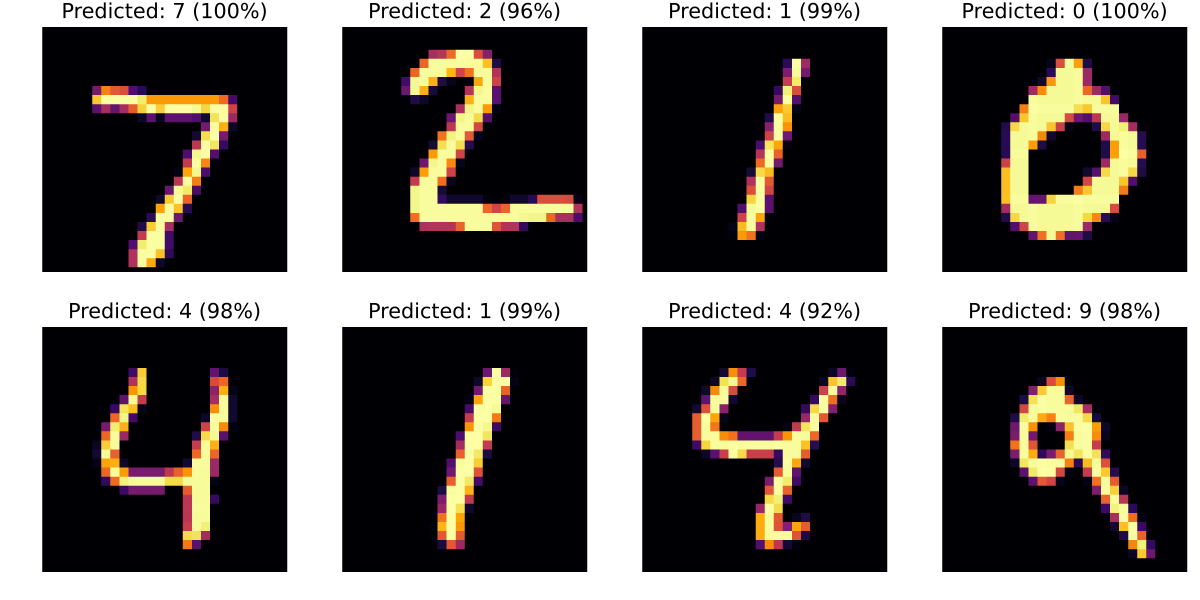
We can also look at the best and worst four predictions:
x, y = only(data_loader(test_data; batchsize = length(test_data)))y_model, _ = chain(x, parameters, state)losses = Lux.CrossEntropyLoss(; agg = identity)(y_model, y)indices = sortperm(losses; dims = 2)[[1:4; (end-3):end]]plots = [plot_image(predictor, test_data[i].features) for i in indices]Plots.plot(plots...; size = (1200, 600), layout = (2, 4))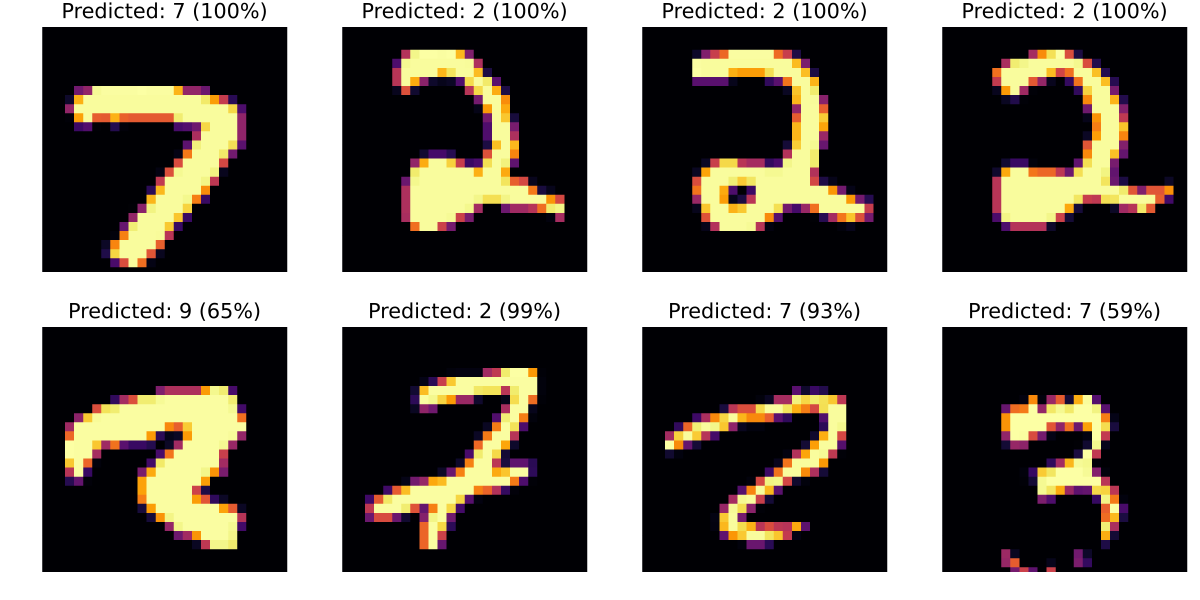
There are still some fairly bad mistakes. Can you change the model or training parameters improve to improve things?
JuMP
Now that we have a trained machine learning model, we can embed it in a JuMP model.
Here's a function which takes a test case and returns an example that maximizes the probability of the adversarial example.
function find_adversarial_image(test_case; adversary_label, δ = 0.05) model = Model(Ipopt.Optimizer) set_silent(model) @variable(model, 0 <= x[1:28, 1:28] <= 1) @constraint(model, -δ .<= x .- test_case.features .<= δ) # Note: we need to use `vec` here because `x` is a 28-by-28 Matrix, but our # neural network expects a 28^2 length vector. y, _ = MathOptAI.add_predictor(model, predictor, vec(x)) @objective(model, Max, y[adversary_label+1] - y[test_case.targets+1]) optimize!(model) @assert is_solved_and_feasible(model) return value.(x)endfind_adversarial_image (generic function with 1 method)Let's try finding an adversarial example to the third test image. The image on the left is our input image. The network thinks this is a 1 with probability 99%. The image on the right is the adversarial image. The network thinks this is a 7, although it is less confident.
x_adversary = find_adversarial_image(test_data[3]; adversary_label = 7);Plots.plot( plot_image(predictor, test_data[3].features), plot_image(predictor, Float32.(x_adversary)),)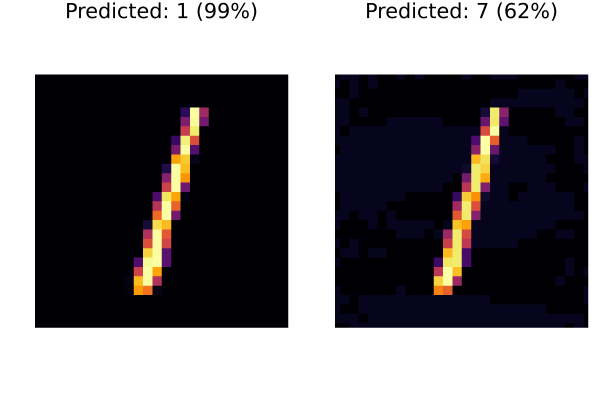
This page was generated using Literate.jl.