Input Convex Neural Networks with Flux.jl
This tutorial shows how to embed an input convex neural network (ICNN) model from Flux.jl into JuMP.
See Input Convex Neural Networks with PyTorch for this tutorial using PyTorch, and see Input Supermodular Neural Networks with Flux.jl for a related form of network.
Required packages
This tutorial requires the following packages:
using JuMPimport ExaModelsimport Fluximport HiGHSimport Ipoptimport MathOptAIimport NLPModelsIpoptimport Plotsimport Randomimport SCSBuilding the ICNN
Consider a neural network with the following structure:
\[\begin{aligned} z_1 & = \sigma_1(D_1 x + b_1) \\ z_k & = \sigma_k(W_{k-1} z_{k-1} + b_k + D_k x), \ \forall k = 2, \ldots, K \end{aligned}\]
If the weights $W$ are non-negative and $\sigma$ is a convex activation function then the output of the network $z_K$ is convex with respect to $x$, and we say that the network is an Input Convex Neural Network (ICNN).
struct InputConvexNN{T} <: MathOptAI.AbstractPredictor D::Vector{Matrix{T}} W::Vector{Matrix{T}} b::Vector{Vector{T}} σ::Vector{Function}endFlux.@layer(InputConvexNN, trainable = (D, W, b))function InputConvexNN( dim_in::Int, layers::Pair{Int,<:Function}...; init = Flux.glorot_uniform,) dims, K = first.(layers), length(layers) D = [init(dims[k], dim_in) for k in 1:K] W = [init(dims[k], dims[k-1]) for k in 2:K] b = [init(dims[k]) for k in 1:K] return InputConvexNN(D, W, b, Function[last(l) for l in layers])endfunction (nn::InputConvexNN)(x::AbstractVector) z = nn.σ[1].(nn.D[1] * x .+ nn.b[1]) for k in 2:length(nn.D) z = nn.σ[k].(Flux.softplus.(nn.W[k-1]) * z .+ nn.b[k] .+ nn.D[k] * x) end return zendHere's an example:
chain = InputConvexNN(8, 2 => Flux.relu, 1 => Flux.relu)InputConvexNN(
2-element Vector{Matrix{Float32}}, # 24 parameters
1-element Vector{Matrix{Float32}}, # 2 parameters
2-element Vector{Vector{Float32}}, # 3 parameters
) # Total: 5 arrays, 29 parameters, 588 bytes.chain(rand(8))1-element Vector{Float64}:
0.0Building the Predictor
We need to implement add_predictor for InputConvexNN in order to be able to embed this network into JuMP.
function MathOptAI.add_predictor( model::JuMP.AbstractModel, nn::InputConvexNN, x::Vector; kwargs...,) formulation = MathOptAI.PipelineFormulation(nn, Any[]) p = MathOptAI.Affine(nn.D[1], nn.b[1]) z, inner = MathOptAI.add_predictor(model, p, x) push!(formulation.layers, inner) z, inner = MathOptAI.add_predictor(model, nn.σ[1], z; kwargs...) push!(formulation.layers, inner) for k in 2:length(nn.D) p = MathOptAI.Affine([Flux.softplus.(nn.W[k-1]) nn.D[k]], nn.b[k]) z, inner = MathOptAI.add_predictor(model, p, [z; x]) push!(formulation.layers, inner) z, inner = MathOptAI.add_predictor(model, nn.σ[k], z; kwargs...) push!(formulation.layers, inner) end return z, formulationendWith that, we are now ready to embed these networks into JuMP.
Embed ICNN into JuMP
Let us build a small ICNN first.
predictor = InputConvexNN(2, 3 => Flux.relu, 1 => Flux.relu)InputConvexNN(
2-element Vector{Matrix{Float32}}, # 8 parameters
1-element Vector{Matrix{Float32}}, # 3 parameters
2-element Vector{Vector{Float32}}, # 4 parameters
) # Total: 5 arrays, 15 parameters, 532 bytes.We can now embed predictor into a JuMP model. We choose to embed the Flux.relu using ReLUSOS1:
model = Model()@variable(model, x[1:2])config = Dict(Flux.relu => MathOptAI.ReLUSOS1)z, formulation = MathOptAI.add_predictor(model, predictor, x; config);z1-element Vector{JuMP.VariableRef}:
moai_ReLU[1]formulationAffine(A, b) [input: 2, output: 3]
├ variables [3]
│ ├ moai_Affine[1]
│ ├ moai_Affine[2]
│ └ moai_Affine[3]
└ constraints [3]
├ -0.3637503683567047 x[1] + 0.326200008392334 x[2] - moai_Affine[1] = 1.1433569192886353
├ 0.6929140686988831 x[1] - 0.7219537496566772 x[2] - moai_Affine[2] = 0.8120035529136658
└ -0.37119945883750916 x[1] - 0.56111079454422 x[2] - moai_Affine[3] = -0.051543015986680984
MathOptAI.ReLUSOS1()
├ variables [6]
│ ├ moai_ReLU[1]
│ ├ moai_ReLU[2]
│ ├ moai_ReLU[3]
│ ├ moai_z[1]
│ ├ moai_z[2]
│ └ moai_z[3]
└ constraints [12]
├ moai_ReLU[1] ≥ 0
├ moai_z[1] ≥ 0
├ moai_Affine[1] - moai_ReLU[1] + moai_z[1] = 0
├ [moai_ReLU[1], moai_z[1]] ∈ MathOptInterface.SOS1{Float64}([1.0, 2.0])
├ moai_ReLU[2] ≥ 0
├ moai_z[2] ≥ 0
├ moai_Affine[2] - moai_ReLU[2] + moai_z[2] = 0
├ [moai_ReLU[2], moai_z[2]] ∈ MathOptInterface.SOS1{Float64}([1.0, 2.0])
├ moai_ReLU[3] ≥ 0
├ moai_z[3] ≥ 0
├ moai_Affine[3] - moai_ReLU[3] + moai_z[3] = 0
└ [moai_ReLU[3], moai_z[3]] ∈ MathOptInterface.SOS1{Float64}([1.0, 2.0])
Affine(A, b) [input: 5, output: 1]
├ variables [1]
│ └ moai_Affine[1]
└ constraints [1]
└ 0.5892834067344666 x[1] - 1.3519961833953857 x[2] + 1.2439357042312622 moai_ReLU[1] + 0.8406112790107727 moai_ReLU[2] + 1.2106335163116455 moai_ReLU[3] - moai_Affine[1] = -1.4760726690292358
MathOptAI.ReLUSOS1()
├ variables [2]
│ ├ moai_ReLU[1]
│ └ moai_z[1]
└ constraints [4]
├ moai_ReLU[1] ≥ 0
├ moai_z[1] ≥ 0
├ moai_Affine[1] - moai_ReLU[1] + moai_z[1] = 0
└ [moai_ReLU[1], moai_z[1]] ∈ MathOptInterface.SOS1{Float64}([1.0, 2.0])
Epigraph formulations
The nice thing about ICNNs is that we can formulate their epigraph and avoid adding binary variables to the model. For that, we can use ReLUEpigraph.
Let's first train a model to predict the relationship $y = x^2$. (Note that this is a very basic training loop.)
Random.seed!(1234)chain = InputConvexNN(1, 10 => Flux.relu, 1 => Flux.relu)begin X = -2.0f0:0.1f0:2.0f0 optimizer_state = Flux.setup(Flux.Adam(5e-2), chain) for epoch in 1:1_000 _, gradient = Flux.withgradient(chain) do model return sum((only(model([x])) - x^2)^2 for x in X) end Flux.update!(optimizer_state, chain, only(gradient)) endendNow we can embed the trained network into a JuMP model:
model = Model(HiGHS.Optimizer)set_silent(model)@variable(model, x[1:1])config = Dict(Flux.relu => MathOptAI.ReLUEpigraph)y, _ = MathOptAI.add_predictor(model, chain, x; config)@objective(model, Min, only(y))modelA JuMP Model
├ solver: HiGHS
├ objective_sense: MIN_SENSE
│ └ objective_function_type: JuMP.VariableRef
├ num_variables: 23
├ num_constraints: 33
│ ├ JuMP.AffExpr in MOI.EqualTo{Float64}: 11
│ ├ JuMP.AffExpr in MOI.GreaterThan{Float64}: 11
│ └ JuMP.VariableRef in MOI.GreaterThan{Float64}: 11
└ Names registered in the model
└ :xBecause we used the ReLUEpigraph predictor, there are no binary or integer variables in our model.
Moreover, we can show that the objective value y is convex with respect to x:
x_value, y_value = -2:0.1:2, Float64[]for xi in x_value fix(x[1], xi) optimize!(model) # To prove we are solving an LP and not a MIP, require dual solutions. assert_is_solved_and_feasible(model; dual = true) push!(y_value, objective_value(model))endPlots.plot(x_value, y_value; xlabel = "x", ylabel = "y", label = "Trained")Plots.plot!(x_value, x_value .^ 2; label = "Target", linestyle = :dash)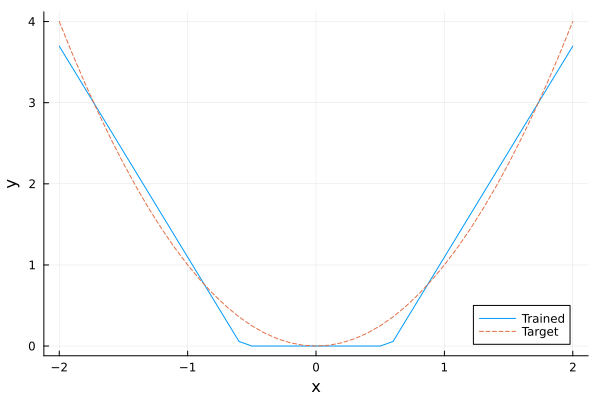
Conic Formulation
We can also use SoftPlusConicEpigraph in the activation functions. The resulting conic formulation can be solved using SCS or any other conic solver.
Random.seed!(1234)chain = InputConvexNN(1, 10 => Flux.softplus, 1 => Flux.softplus)begin X = -2.0f0:0.1f0:2.0f0 optimizer_state = Flux.setup(Flux.Adam(5e-2), chain) for epoch in 1:1000 _, gradient = Flux.withgradient(chain) do model return sum((only(model([x])) - x^2)^2 for x in X) end Flux.update!(optimizer_state, chain, only(gradient)) endendNext, we embed the neural network using SoftPlusConicEpigraph.
model = Model(SCS.Optimizer)set_silent(model)@variable(model, x[1:1])config = Dict(Flux.softplus => MathOptAI.SoftPlusConicEpigraph)y, _ = MathOptAI.add_predictor(model, chain, x; config)@objective(model, Min, only(y))modelA JuMP Model
├ solver: SCS
├ objective_sense: MIN_SENSE
│ └ objective_function_type: JuMP.VariableRef
├ num_variables: 45
├ num_constraints: 44
│ ├ JuMP.AffExpr in MOI.EqualTo{Float64}: 11
│ ├ JuMP.AffExpr in MOI.LessThan{Float64}: 11
│ └ Vector{JuMP.AffExpr} in MOI.ExponentialCone: 22
└ Names registered in the model
└ :xLet's draw the same plot to see the differences in fit with softplus.
x_value, y_value = -2:0.1:2, Float64[]for xi in x_value fix(x[1], xi) optimize!(model) # To prove we are solving an LP and not a MIP, require dual solutions. assert_is_solved_and_feasible(model; dual = true) push!(y_value, objective_value(model))endPlots.plot(x_value, y_value; xlabel = "x", ylabel = "y", label = "Trained")Plots.plot!(x_value, x_value .^ 2; label = "Target", linestyle = :dash)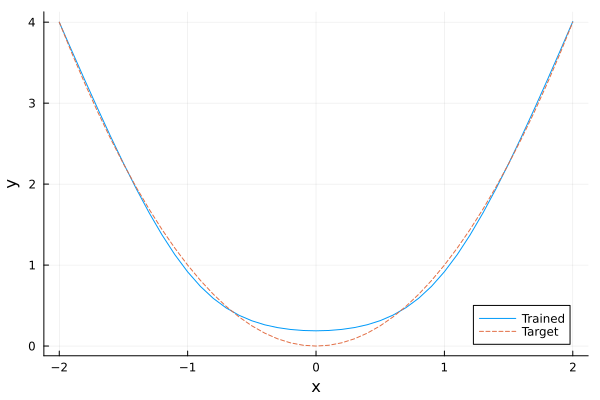
Nonlinear Formulation
We can also use SoftPlusEpigraph in the activation functions. The resulting global nonlinear formulation can be solved using Ipopt or any other nonlinear solver.
model = Model(Ipopt.Optimizer)set_silent(model)@variable(model, x[1:1])config = Dict(Flux.softplus => MathOptAI.SoftPlusEpigraph)y, _ = MathOptAI.add_predictor(model, chain, x; config)@objective(model, Min, only(y))modelA JuMP Model
├ solver: Ipopt
├ objective_sense: MIN_SENSE
│ └ objective_function_type: JuMP.VariableRef
├ num_variables: 23
├ num_constraints: 33
│ ├ JuMP.NonlinearExpr in MOI.GreaterThan{Float64}: 11
│ ├ JuMP.AffExpr in MOI.EqualTo{Float64}: 11
│ └ JuMP.VariableRef in MOI.GreaterThan{Float64}: 11
└ Names registered in the model
└ :xLet's draw the same plot to see the differences in fit with softplus.
x_value, y_value = -2:0.1:2, Float64[]for xi in x_value fix(x[1], xi) optimize!(model) # To prove we are solving an LP and not a MIP, require dual solutions. assert_is_solved_and_feasible(model; dual = true) push!(y_value, objective_value(model))endPlots.plot(x_value, y_value; xlabel = "x", ylabel = "y", label = "Trained")Plots.plot!(x_value, x_value .^ 2; label = "Target", linestyle = :dash)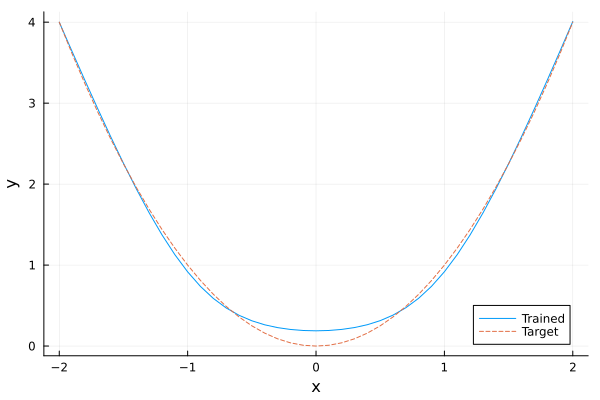
ExaModels
We can do a similar thing with ExaModels:
function MathOptAI.add_predictor( core::ExaModels.ExaCore, nn::InputConvexNN, x::ExaModels.Variable; kwargs...,) formulation = MathOptAI.PipelineFormulation(nn, Any[]) p = MathOptAI.Affine(nn.D[1], nn.b[1]) (core, z), inner = MathOptAI.add_predictor(core, p, x) push!(formulation.layers, inner) (core, z), inner = MathOptAI.add_predictor(core, nn.σ[1], z; kwargs...) push!(formulation.layers, inner) for k in 2:length(nn.D) p = MathOptAI.Affine(Flux.softplus(nn.W[k-1]), nn.b[k]) (core, y), inner = MathOptAI.add_predictor(core, p, z) push!(formulation.layers, inner) # This part is slightly complicated because it's hard to represent # [z; x] in ExaModels. Instead, we add the `x` terms separately. Note # the `-D` because ExaModels does `y - (Ax + b) == 0`. c, (m, n) = only(inner.constraints), size(nn.D[k]) D = [(i, j, -nn.D[k][i, j]) for i in 1:m for j in 1:n] core, _ = ExaModels.add_con!(core, c, i => v * x[j] for (i, j, v) in D) (core, z), inner = MathOptAI.add_predictor(core, nn.σ[k], y; kwargs...) push!(formulation.layers, inner) end return (core, z), formulationendfunction solve_fixed(chain, x_value) core = ExaModels.ExaCore(; concrete = Val(true)) core, x = ExaModels.add_var(core, 1; lvar = x_value, uvar = x_value) config = Dict(Flux.softplus => MathOptAI.SoftPlusEpigraph) (core, y), _ = MathOptAI.add_predictor(core, chain, x; config) core, _ = ExaModels.add_obj(core, y[i] for i in 1:1) model = ExaModels.ExaModel(core) result = NLPModelsIpopt.ipopt(model; print_level = 0) @assert result.status ∈ (:first_order, :acceptable) return result.objectiveendsolve_fixed (generic function with 1 method)Let's draw the same plot to see the differences in fit with softplus.
x_value = -2:0.1:2y_value = Float64[solve_fixed(chain, xi) for xi in x_value]Plots.plot(x_value, y_value; xlabel = "x", ylabel = "y", label = "Trained")Plots.plot!(x_value, x_value .^ 2; label = "Target", linestyle = :dash)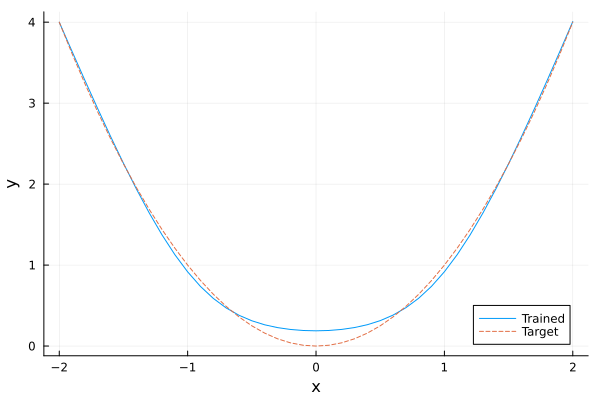
This page was generated using Literate.jl.